
Scalie
An Enterprise Resource Management Platform to Replace Spreadsheet-Driven Operations
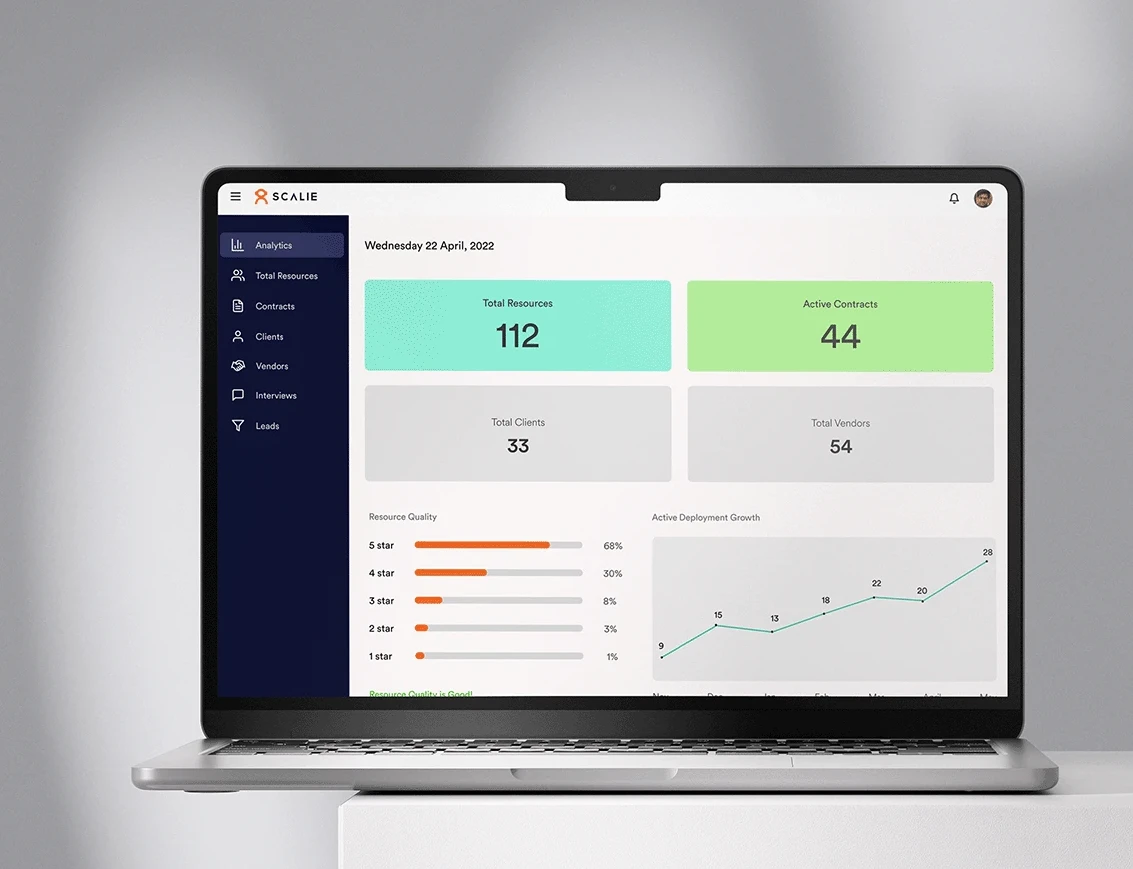
Staffing organizations rely on fragmented Excel spreadsheets, email threads, and phone calls, leaving recruiters struggling to find candidates and managers lacking visibility into available resources.
Designed a centralized enterprise resource management platform linking Vendors, Admins, and Clients with automated resume building, single-screen requirement submission, and contract management.
“How do you transform fragmented hiring, resource allocation, and vendor management workflows into one centralized platform that serves multiple stakeholders?”
Executive Overview
Many staffing organizations still rely on fragmented tools such as spreadsheets, emails, shared documents, and phone calls to manage their workforce. As operations scale, these disconnected workflows create delays, reduce visibility, and make it increasingly difficult to track resources throughout the hiring lifecycle.
Scalie was built to replace these manual processes with a centralized enterprise platform that streamlines resource management from end to end. Instead of managing information across multiple systems, the platform brings together every stakeholder into a single operational workspace where resources, requirements, interviews, contracts, and deployments can be managed collaboratively.
The platform consists of three interconnected panels, each designed to support a different stage of the staffing workflow:
Resource Submissions & Bench
Requirements & Talent Evaluation
Operational Hub & Governance
The Opportunity
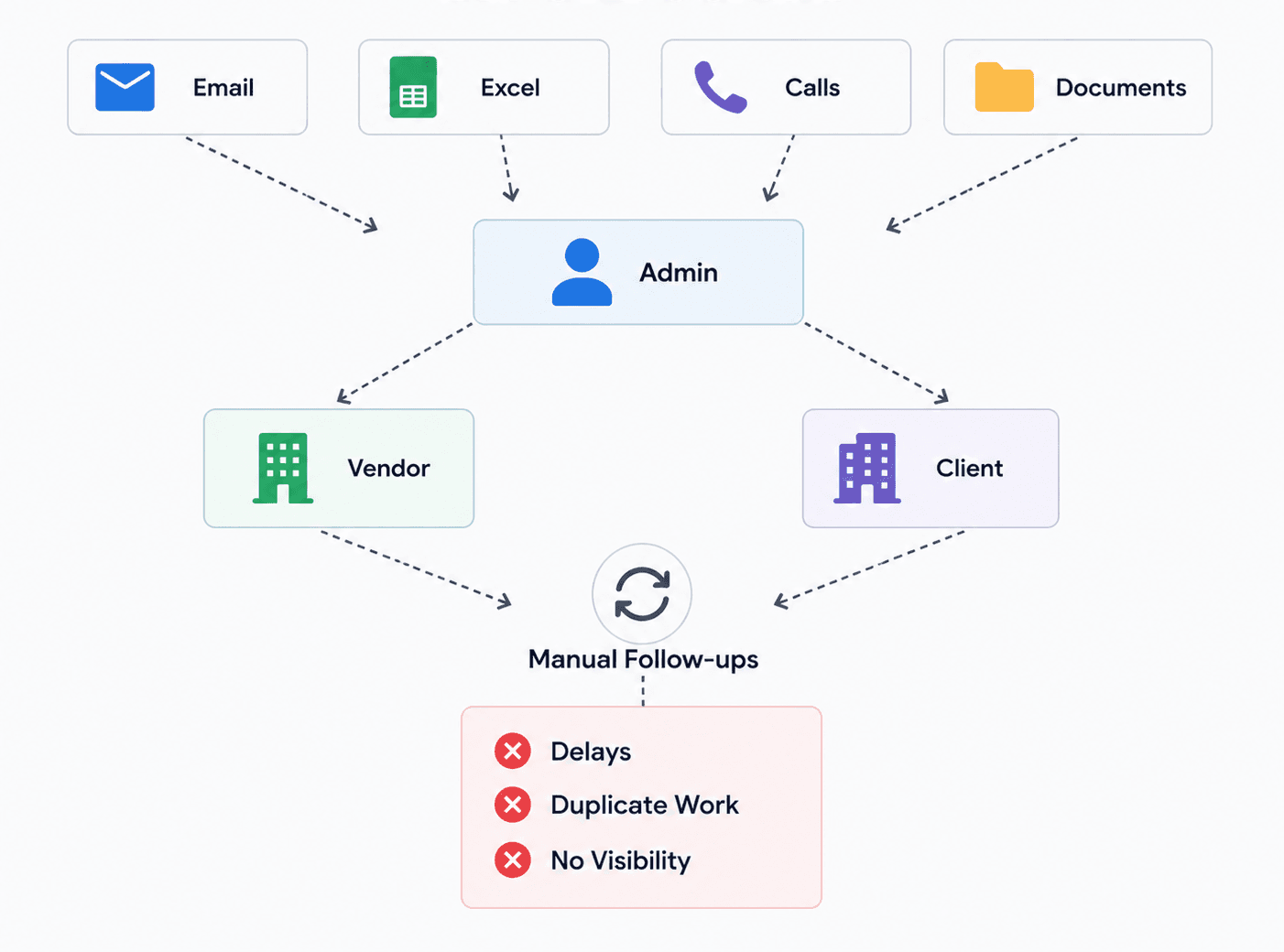
Many staffing organizations still rely on fragmented tools to manage their workforce.
This creates several operational challenges:
As teams grow, these disconnected processes become increasingly difficult to manage.
The opportunity was to replace these manual workflows with a centralized platform that provides visibility, consistency, and operational efficiency.
The Challenge
Designing Scalie wasn't about creating another dashboard.
It was about simplifying a highly interconnected operational workflow.
Every action performed by one stakeholder directly affected another.
Each stage depends on accurate information flowing across multiple teams.
The challenge was designing an experience that keeps everyone aligned while reducing unnecessary manual effort.
My Role
As the Product Designer, I was responsible for designing the MVP experience from discovery through validation.
My responsibilities included:
Understanding the Existing Workflow
Before exploring interfaces, I wanted to understand how resource allocation actually worked.
Through stakeholder discussions and workflow analysis, it became clear that most operational delays weren't caused by a lack of tools.
They were caused by disconnected information.
Teams constantly switched between spreadsheets, emails, and phone conversations simply to understand:
Rather than designing isolated screens, the goal became designing a connected operational system.
Understanding Stakeholders
Scalie supports three primary user groups.
Although they interact with the same platform, each stakeholder has completely different priorities.
Vendors focus on supplying qualified resources. They need visibility into:
- • Client requirements
- • Candidate submissions
- • Interview status
- • Contracts
- • Deployment updates
Clients are primarily concerned with selecting suitable candidates. Their workflow revolves around:
- • Reviewing profiles
- • Tracking interviews
- • Providing feedback
- • Approving contracts
- • Monitoring deployments
The admin acts as the operational bridge between vendors and clients. Responsibilities include:
- • Managing requirements
- • Reviewing submissions
- • Scheduling interviews
- • Maintaining contracts
- • Monitoring performance
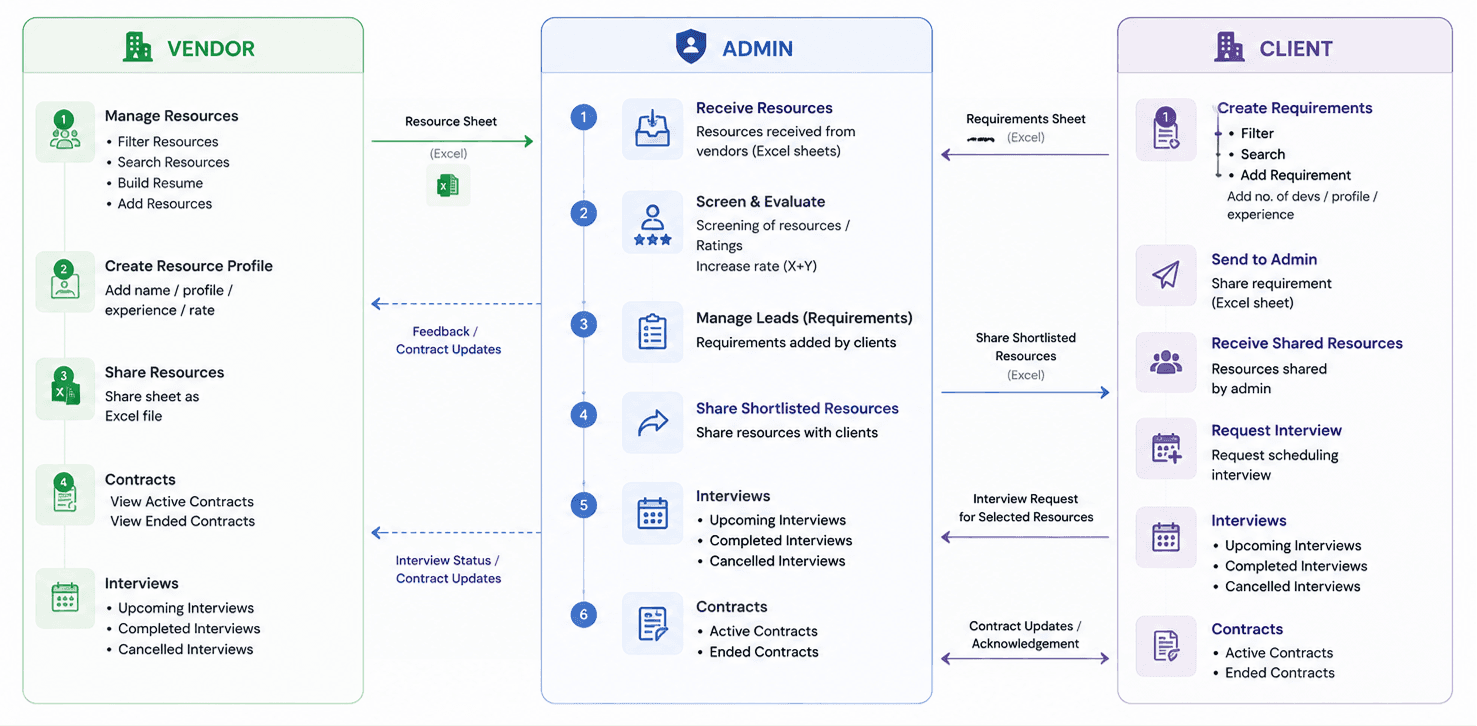
Systemic Dependencies after developing the MVP
Scalie connects Vendors, Administrators, and Clients through a shared operational workflow. While the MVP streamlined most interactions, a few cross-panel dependencies continued to rely on manual coordination and were planned for future iterations.
Discovery & Research
To understand how teams currently worked, I conducted stakeholder discussions, reviewed existing documentation, and analyzed competing enterprise resource management platforms.
Rather than beginning with interface ideas, the objective was to understand how information moved throughout the organization.
This revealed that many inefficiencies were not interaction problems but workflow problems.
Key Findings — Several patterns consistently emerged:
Critical resource information existed across multiple systems, making it difficult to maintain a single source of truth.
Simple actions often required multiple emails or phone calls before progressing.
Teams struggled to understand current availability, deployment status, and interview progress.
Creating resumes, updating spreadsheets, and sharing documents consumed significant operational time.
Design Principles
Research informed four principles that guided the product.
Create one source of truth
Users should never question where the latest information exists.
Reduce operational overhead
Every repetitive manual task should be simplified wherever possible.
Surface information progressively
Complex enterprise workflows should feel manageable by revealing only the information users need at each stage.
Support collaboration
The platform should make handoffs between vendors, admins, and clients seamless rather than requiring constant external communication.
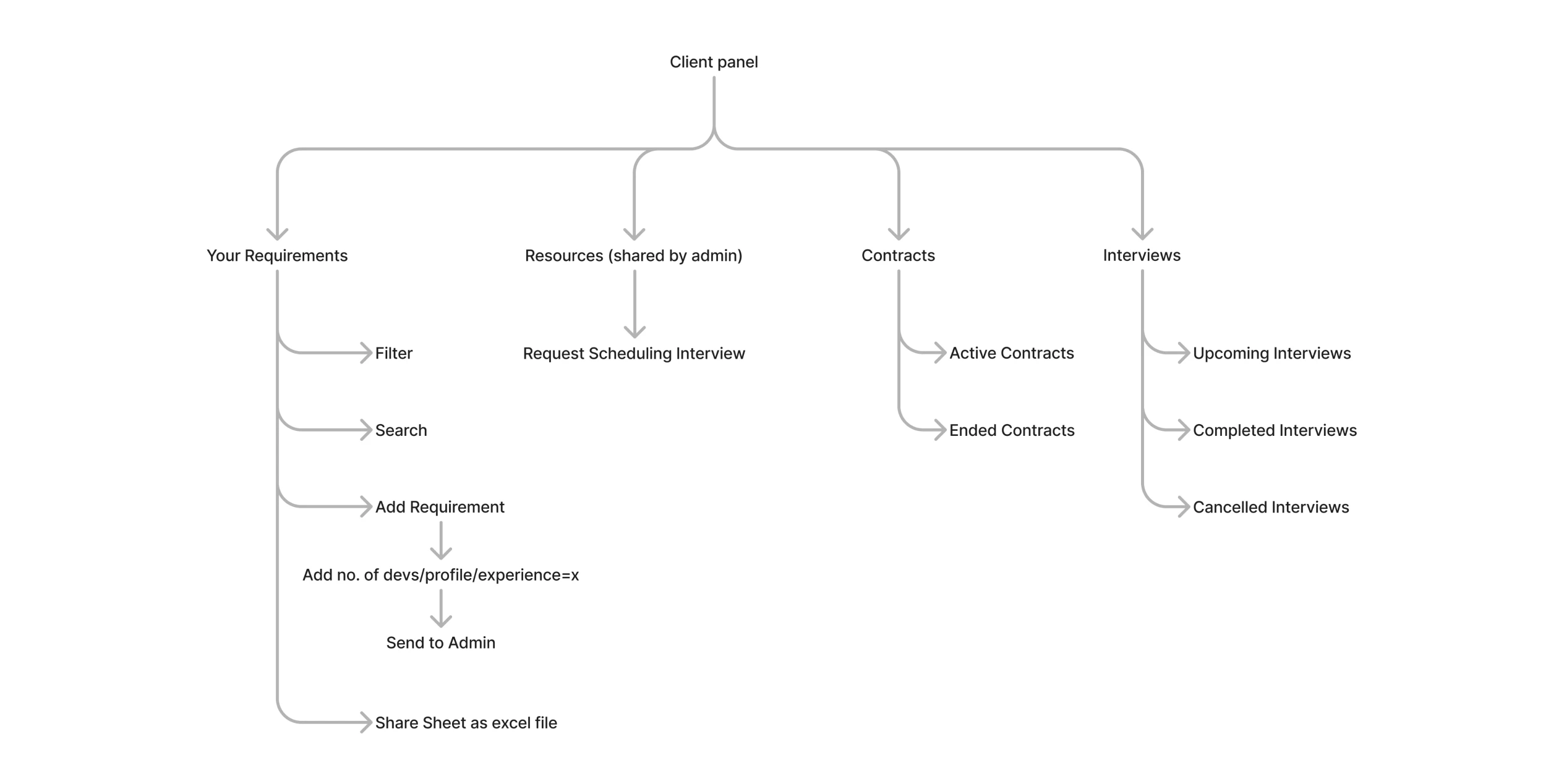
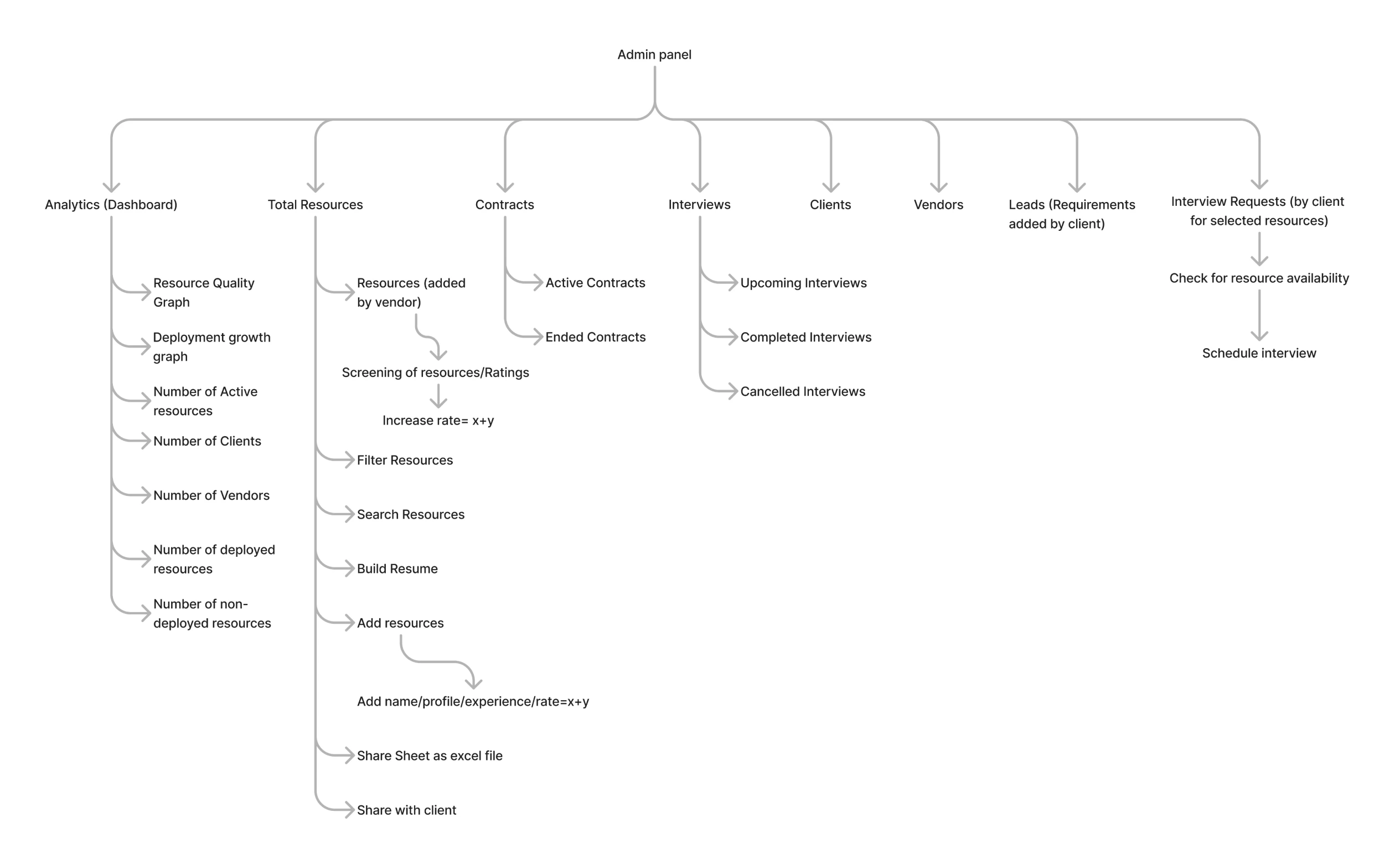
Information Architecture
Enterprise products succeed or fail based on structure.
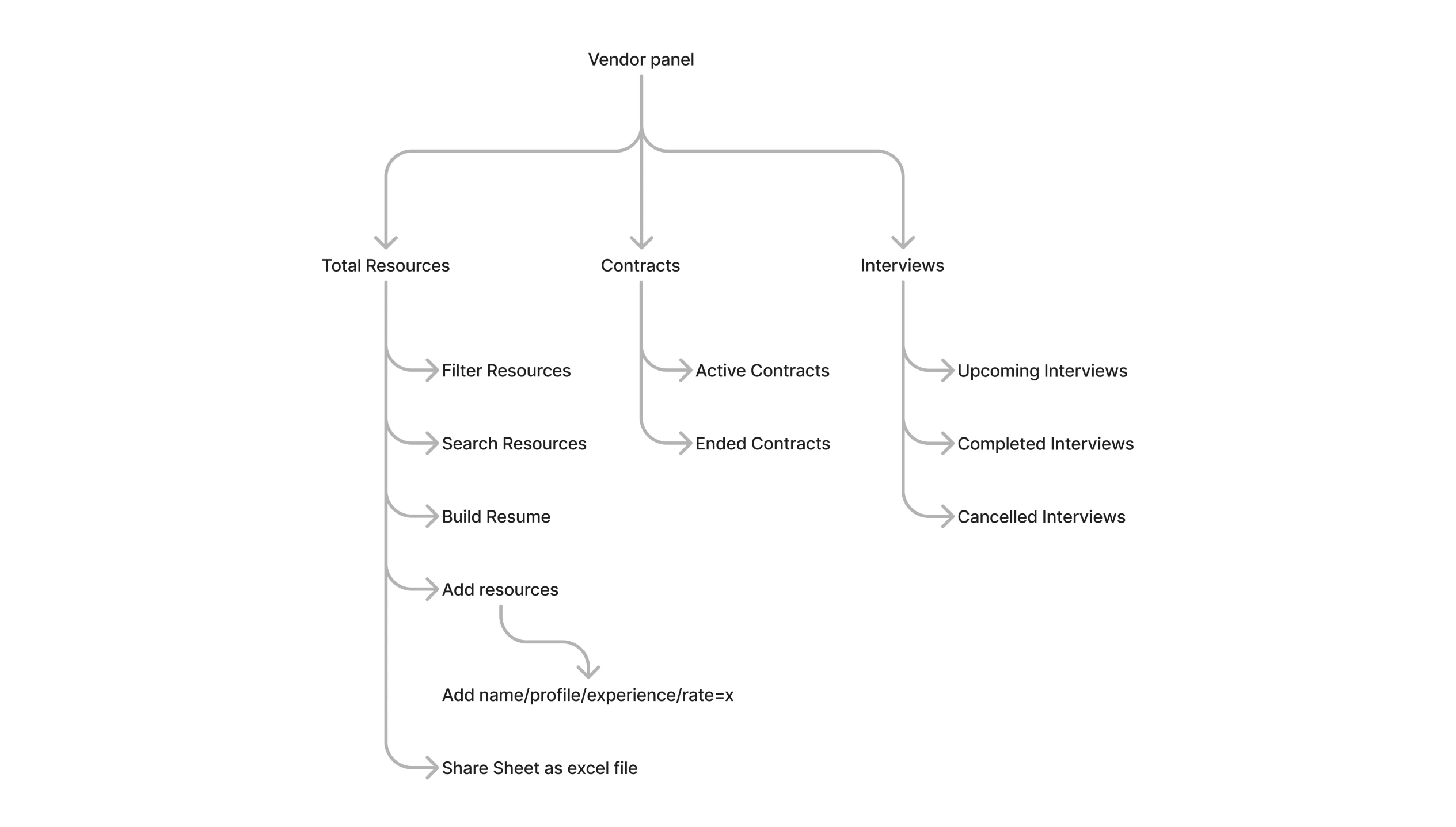
Before designing interfaces, I mapped the relationships between requirements, resources, interviews, contracts, vendors, and deployments.
This ensured the navigation reflected how users actually think about their work instead of how data happened to be stored.
Designing the Experience
Instead of treating every module as an independent feature, Scalie was designed as one continuous operational workflow.
Every screen exists to support one stage of this workflow.
Vendor Experience
The vendor portal enables staffing partners to manage candidate submissions from a single workspace.
Rather than switching between multiple spreadsheets and communication channels, vendors receive clear visibility into every stage of the hiring process.
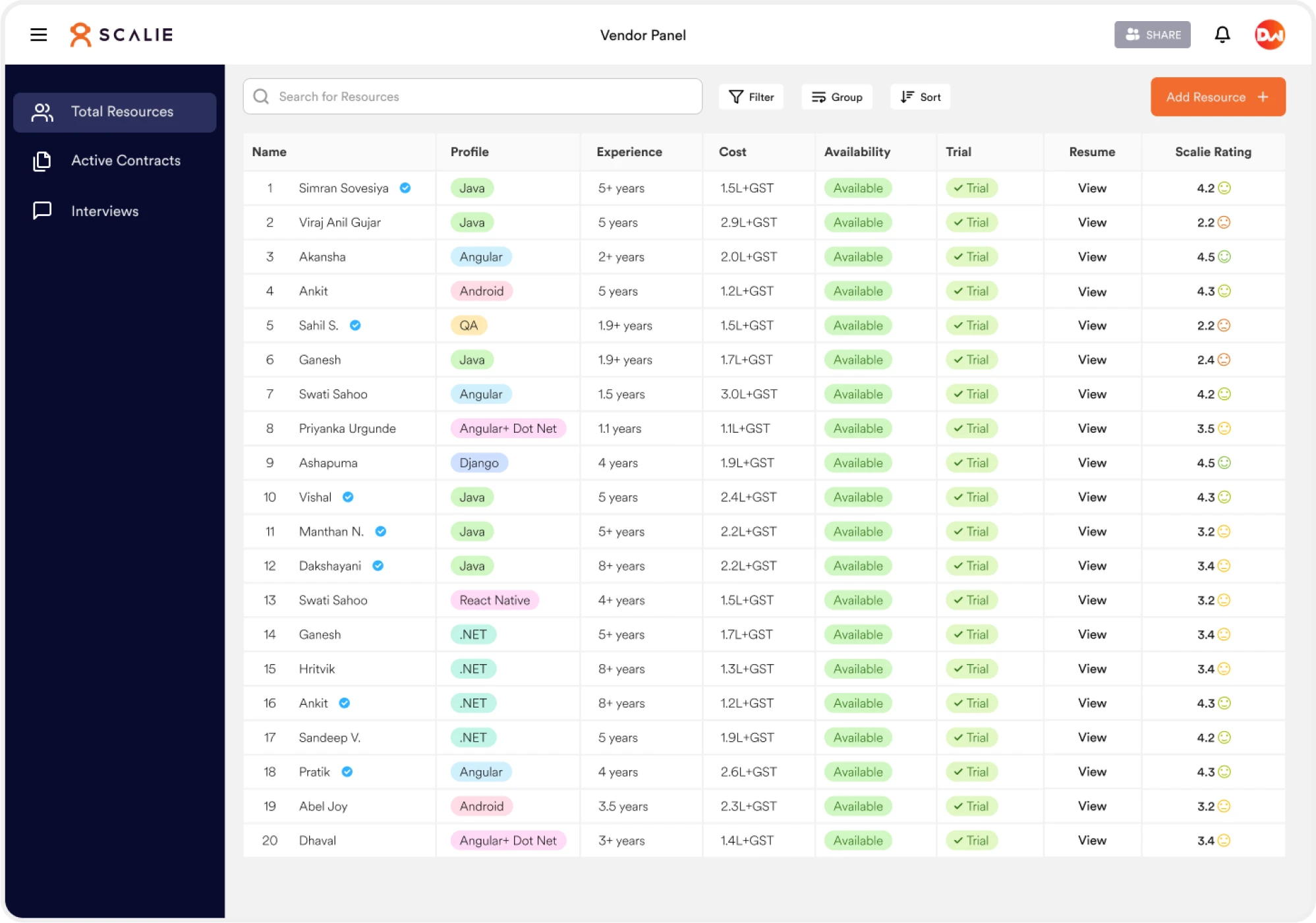
Vendors can browse active client requirements, understand skill expectations, and submit suitable resources directly through the platform.
The interface prioritizes clarity by presenting only the information required to make submission decisions.
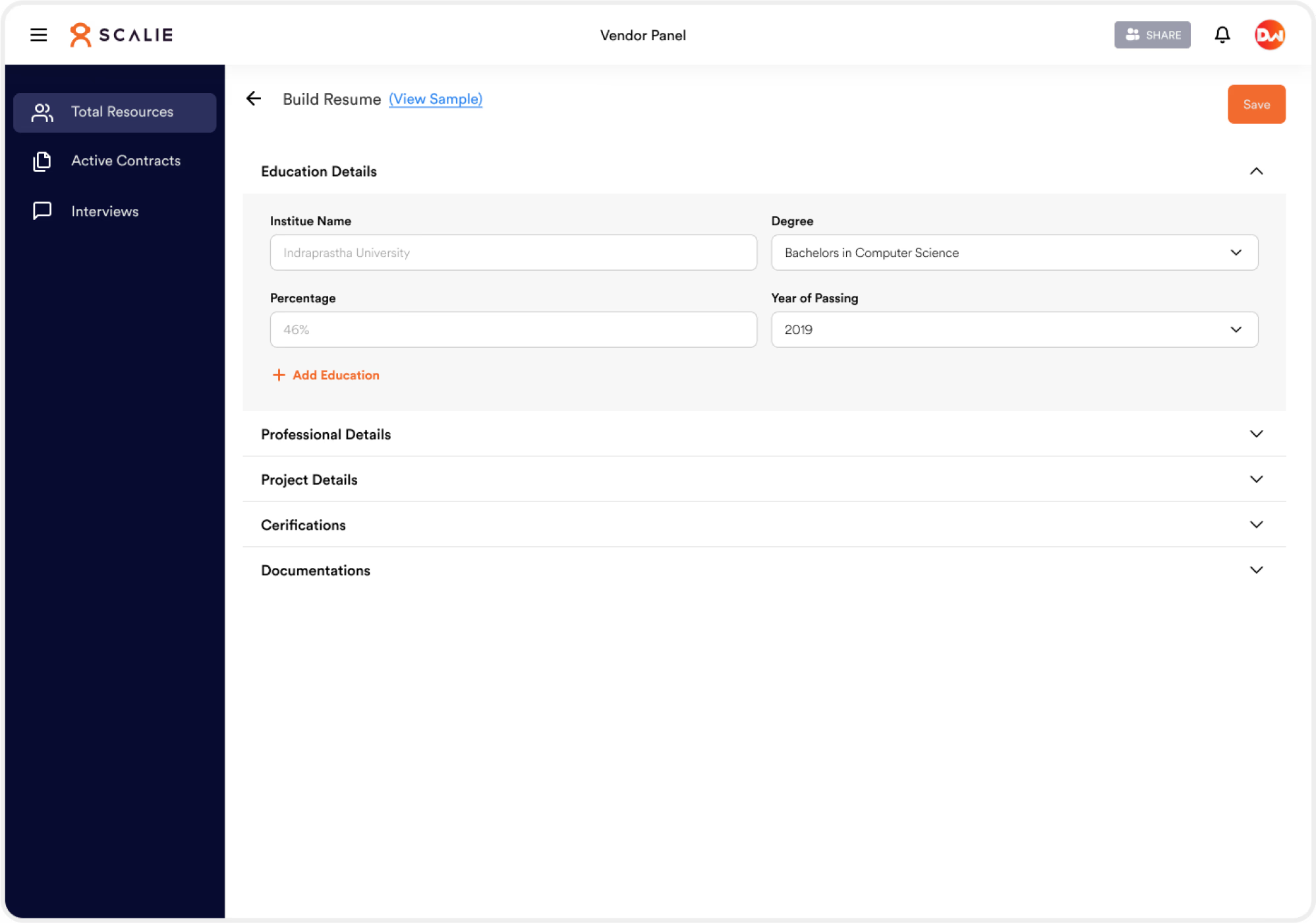
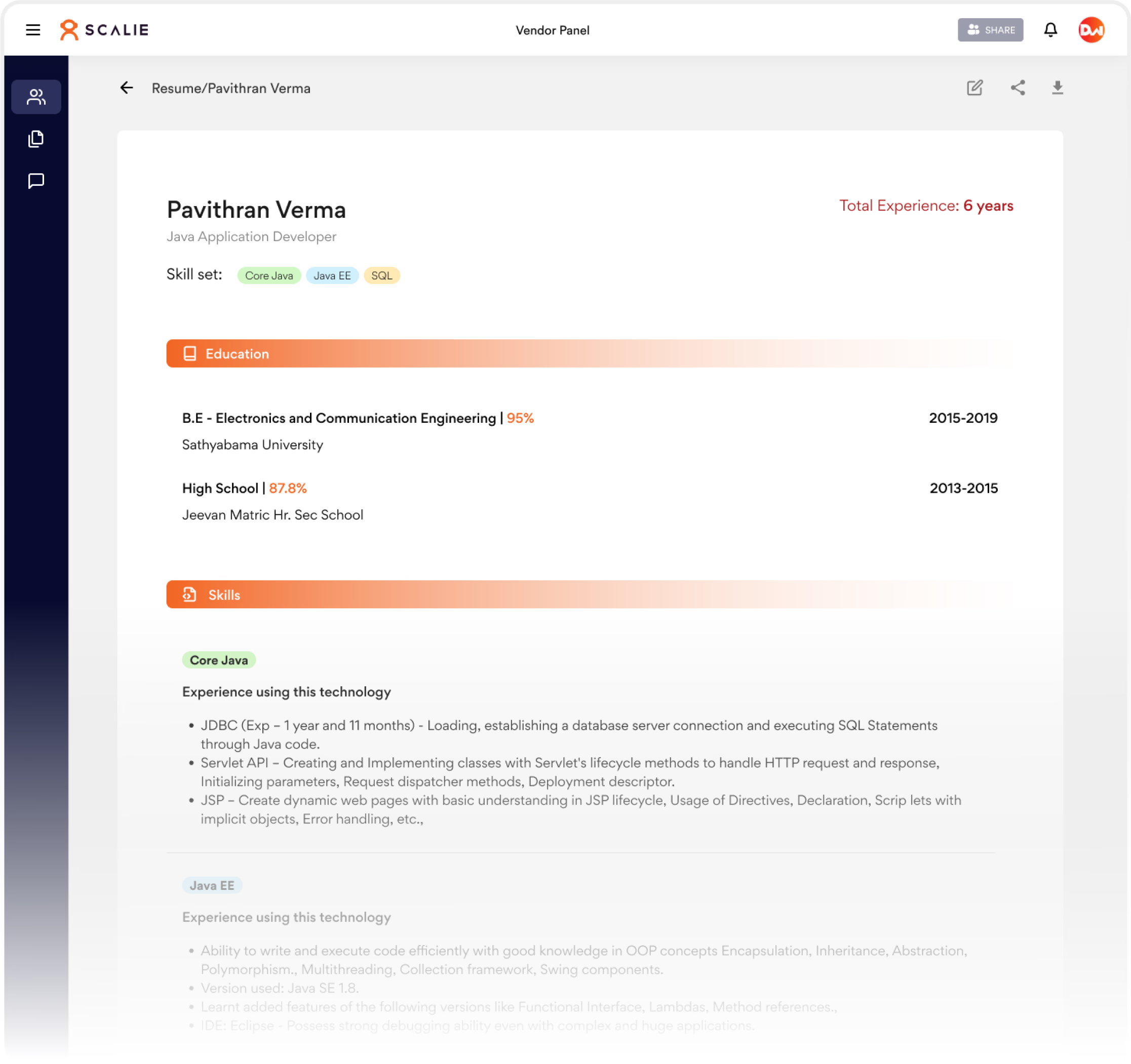
Resume Builder
One recurring pain point identified during discovery was the inconsistency of candidate resumes.
Different vendors submitted profiles in different formats, creating unnecessary work for internal teams.
To address this, Scalie introduced a standardized resume builder that helps generate consistent candidate profiles before submission.
Designing the Client Experience
Although Scalie was launched as an MVP, the client experience was carefully planned as part of the overall ecosystem.
Instead of simply displaying available resources, the objective was to help clients quickly communicate hiring needs while reducing back-and-forth conversations with the internal team.
Every interaction was designed to capture structured information that could be immediately acted upon by the operations team.
Submitting Resource Requirements
Hiring requests often arrive through emails, spreadsheets, or phone calls, making them difficult to track consistently.
To simplify this process, Scalie introduced a structured requirement flow that guides clients through the information needed to begin sourcing candidates.
Breaking the workflow into smaller steps reduces cognitive load while ensuring no critical information is missed.
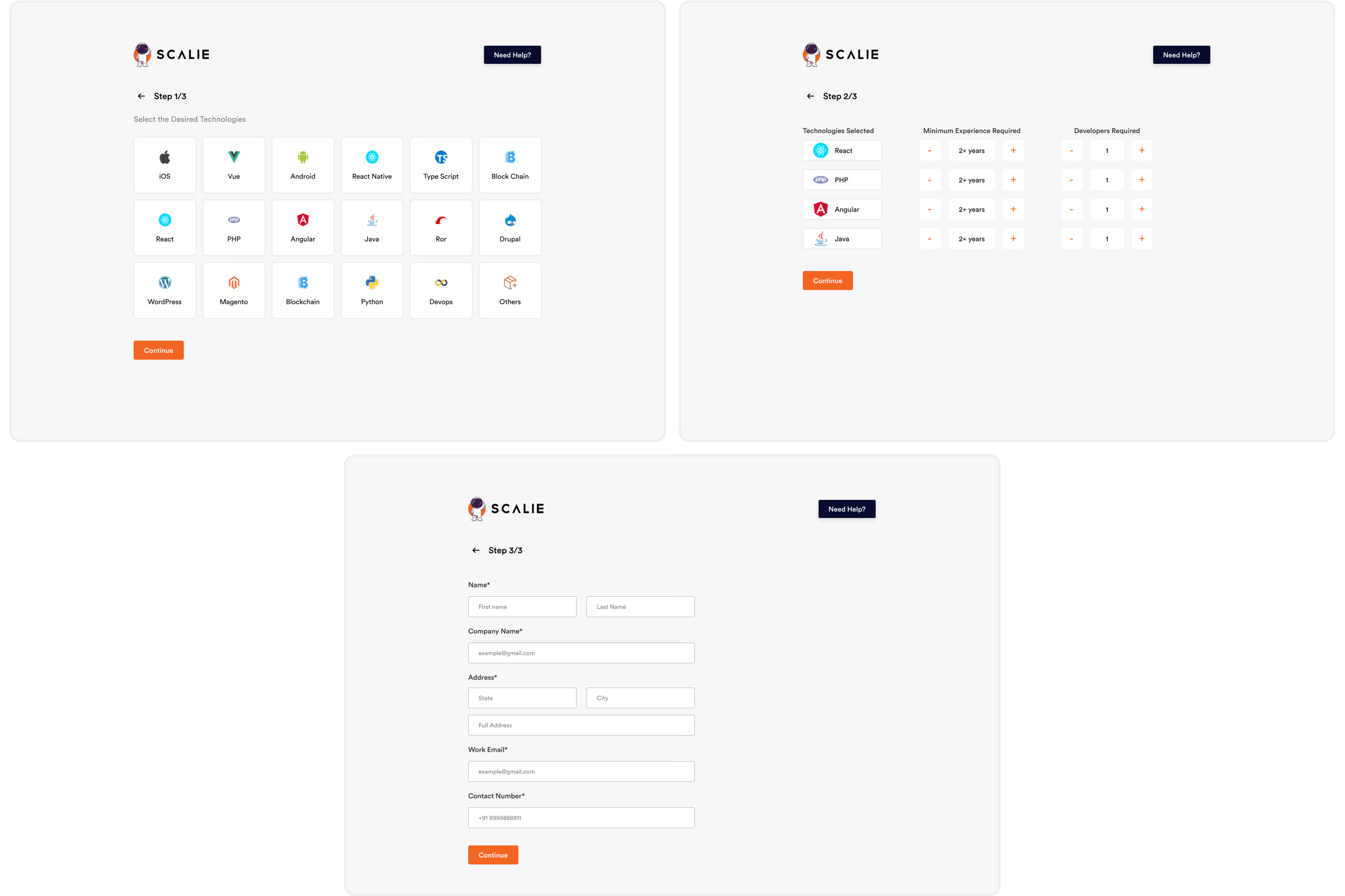
Rather than presenting one long form, the workflow was divided into logical steps based on how hiring managers naturally think about recruitment. Instead of asking for every detail at once, the interface progressively captures technical requirements before moving into organizational information. This approach reduces abandonment and improves data quality.
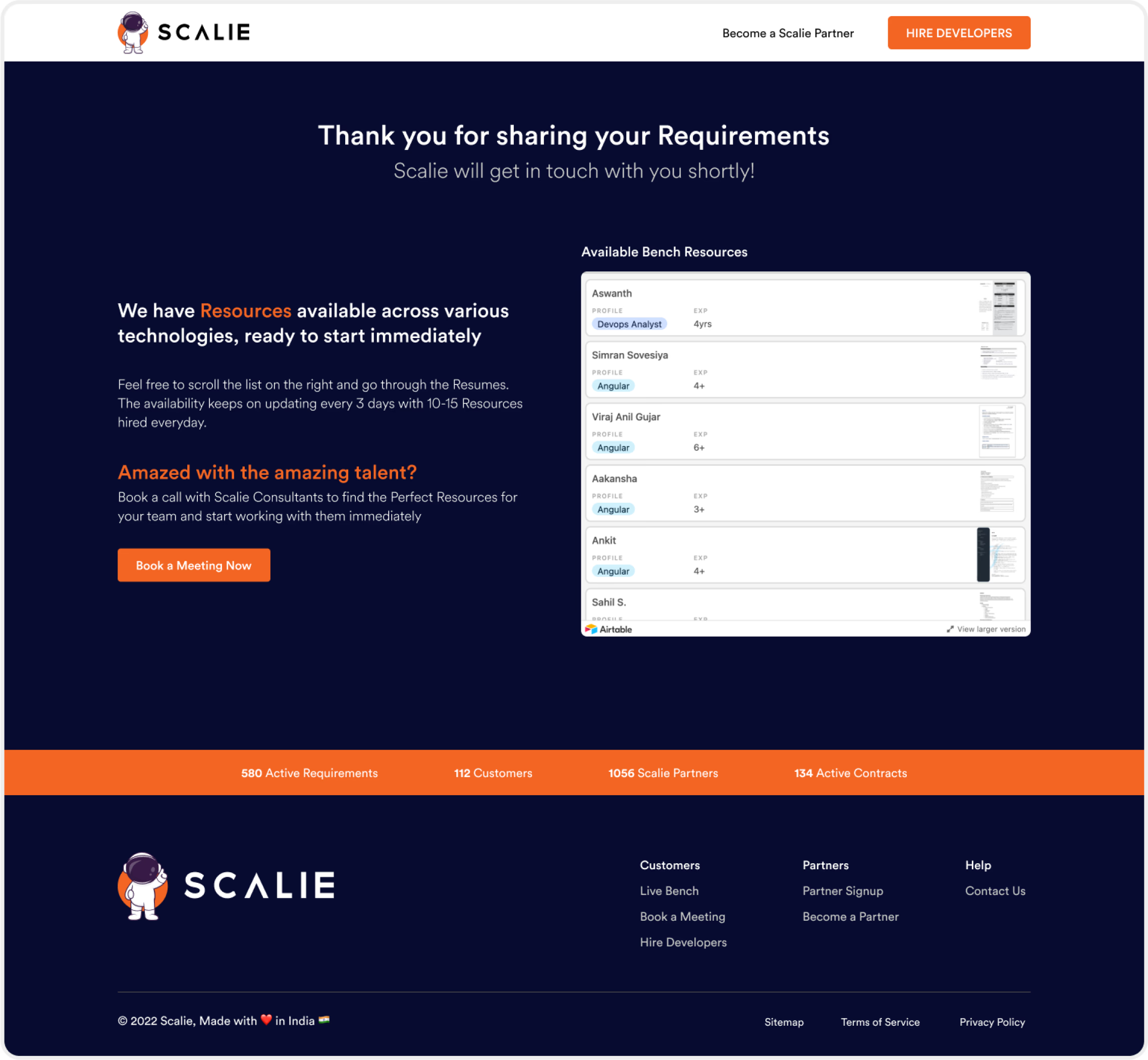
Requirement Confirmation
After submission, clients receive a confirmation screen while the internal team begins reviewing the request.
The interface also surfaces available bench resources, helping clients understand the platform's capabilities without waiting for manual communication.
Designing the Admin Experience
If vendors and clients represent the edges of the system, the Admin Panel represents its operational center.
Almost every workflow eventually passes through the internal operations team.
This meant the admin experience needed to prioritize efficiency over aesthetics.
Rather than designing individual screens, the objective was to support the complete resource lifecycle from one centralized workspace.
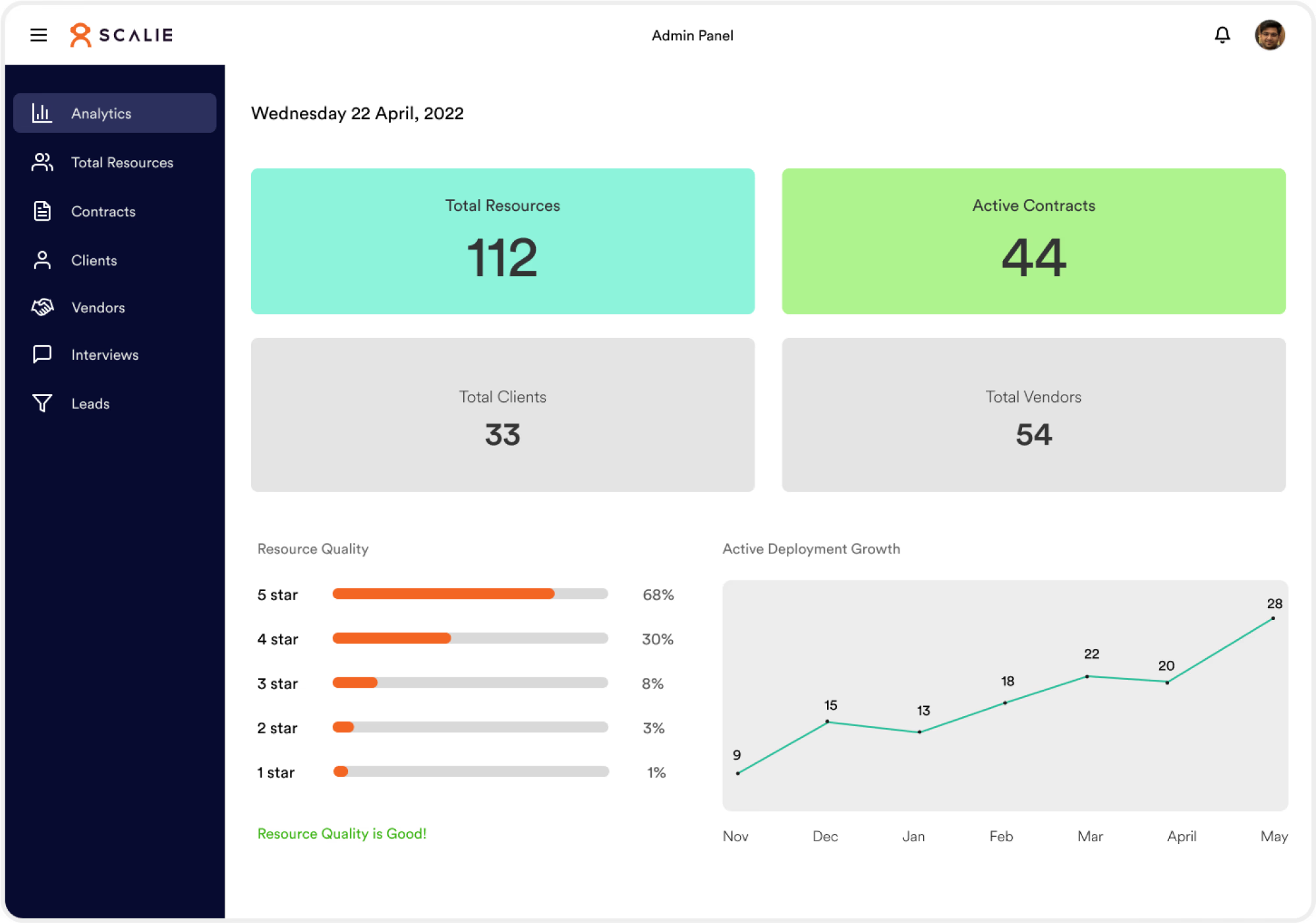
The dashboard provides a high-level overview of platform activity, allowing administrators to understand operational health without navigating across multiple pages.
These metrics help teams quickly identify bottlenecks and monitor platform performance.
Enterprise dashboards often overwhelm users with excessive information. Instead, Scalie prioritizes only the metrics that directly influence staffing decisions. This creates a cleaner overview while keeping operational insights immediately accessible.
Managing Resources
One of the most frequent administrative tasks involves reviewing and managing vendor-submitted resources.
Instead of relying on spreadsheets, every resource is maintained within a centralized system.
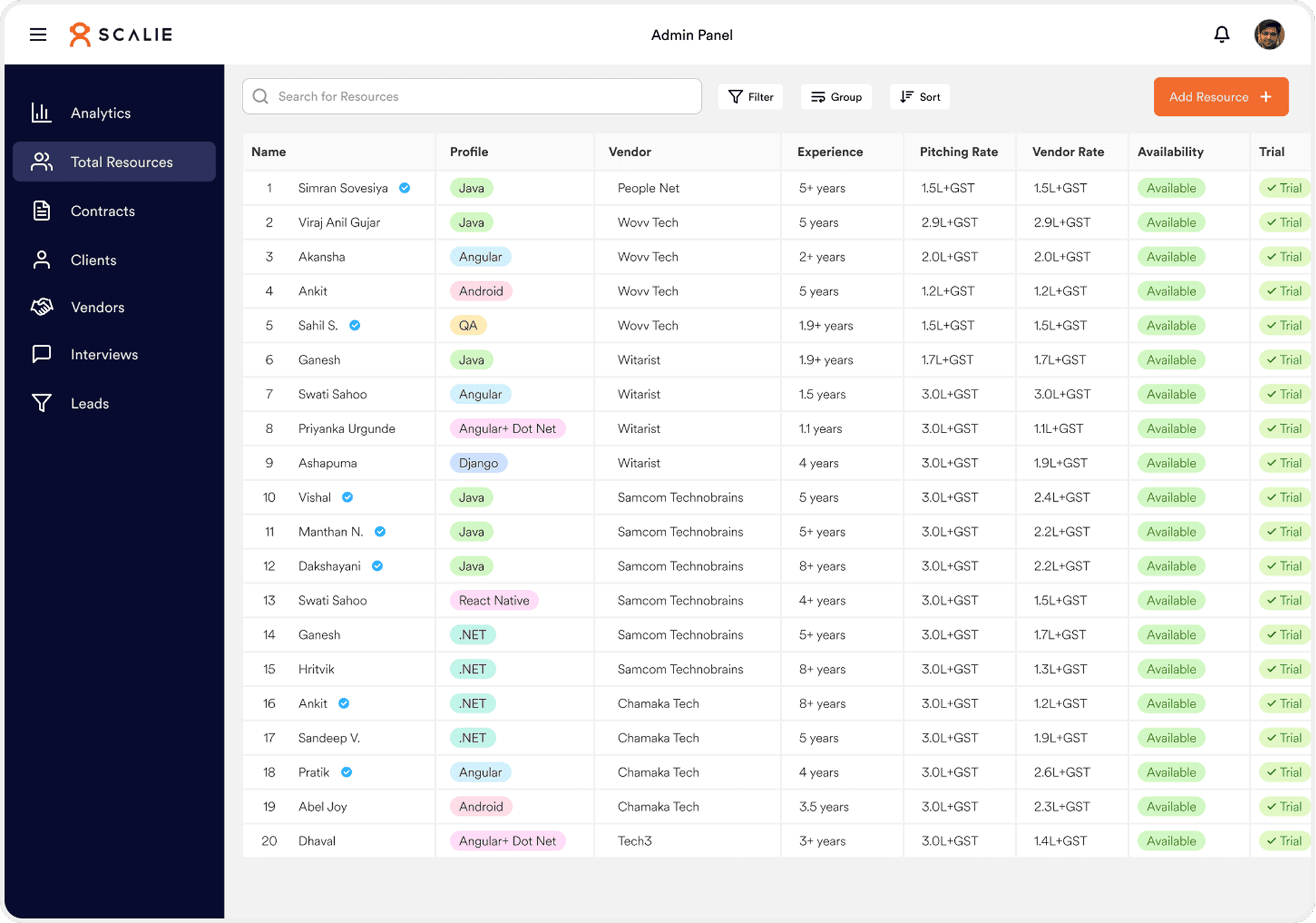
Tables remain the most efficient interface for enterprise resource management because they support rapid comparison across multiple attributes. Rather than replacing tables with cards, the experience enhances them using filtering, sorting, visual status indicators, and quick actions.
Contract Management
Once a candidate is selected, the workflow progresses into contract creation.
Administrators can generate contracts by combining vendor information, client information, commercial details, and legal documentation into a single workflow.
This eliminates scattered documents and improves record consistency.
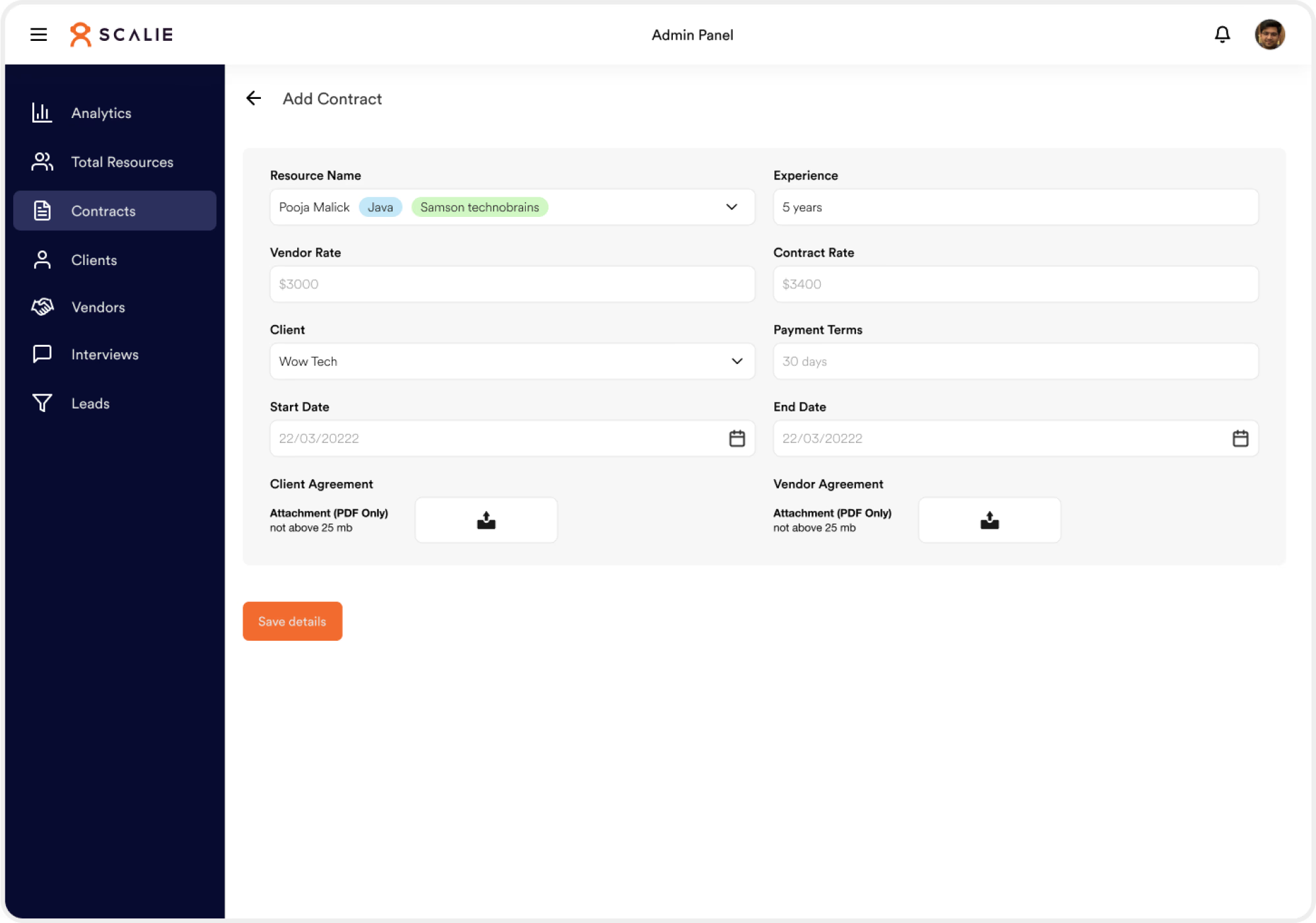
Supporting document uploads directly inside the workflow prevents users from switching between external storage systems during contract creation. Keeping the process within one interface reduces friction and improves traceability.
Interview Scheduling
Interview coordination previously required multiple conversations between clients, vendors, and administrators.
Scalie centralizes this process into a dedicated scheduling workflow.
Any changes automatically become visible throughout the platform.
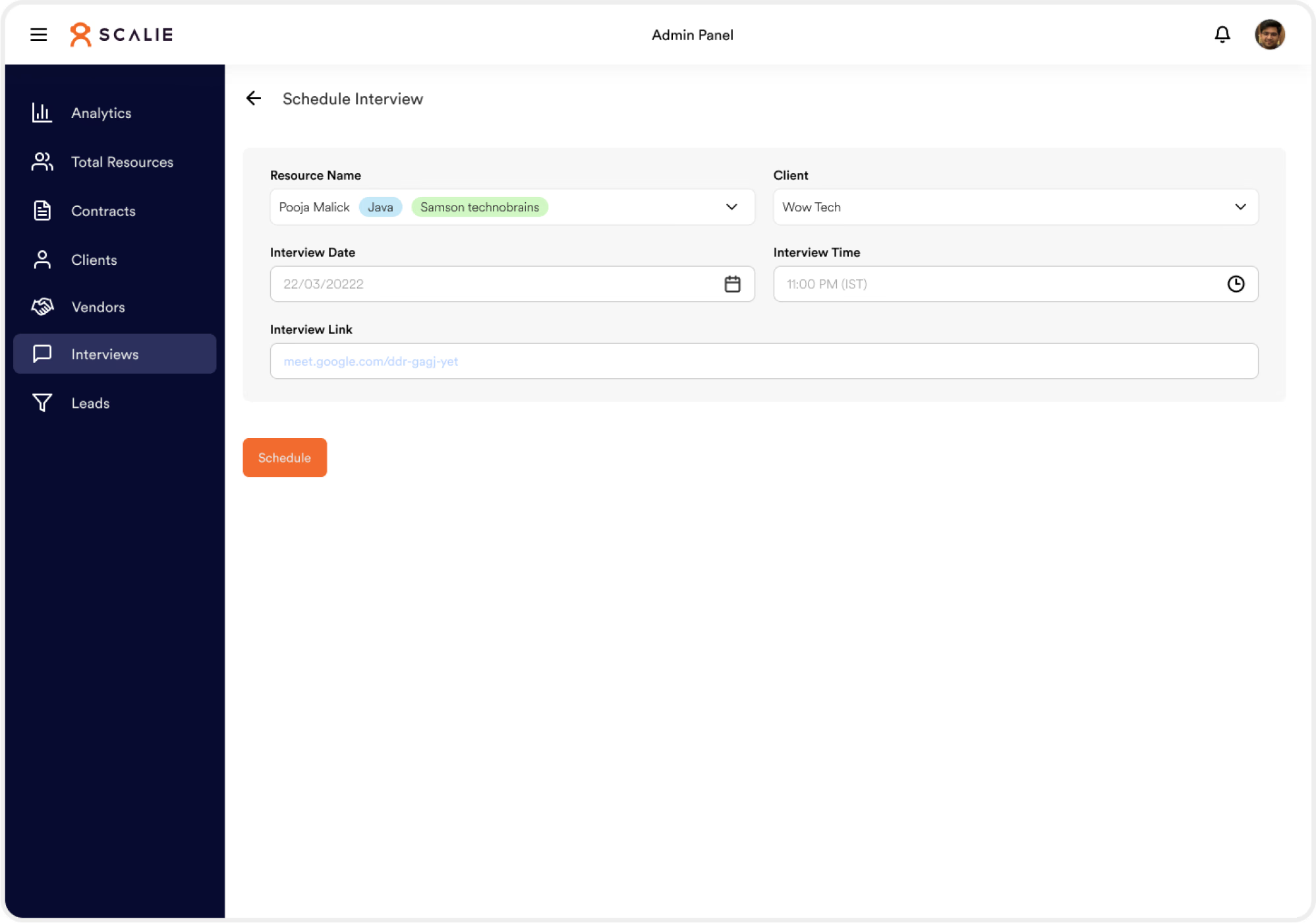
Instead of treating interviews as standalone events, they become connected milestones within the resource lifecycle. This allows stakeholders to understand candidate progress without manually requesting updates.
Lead Management
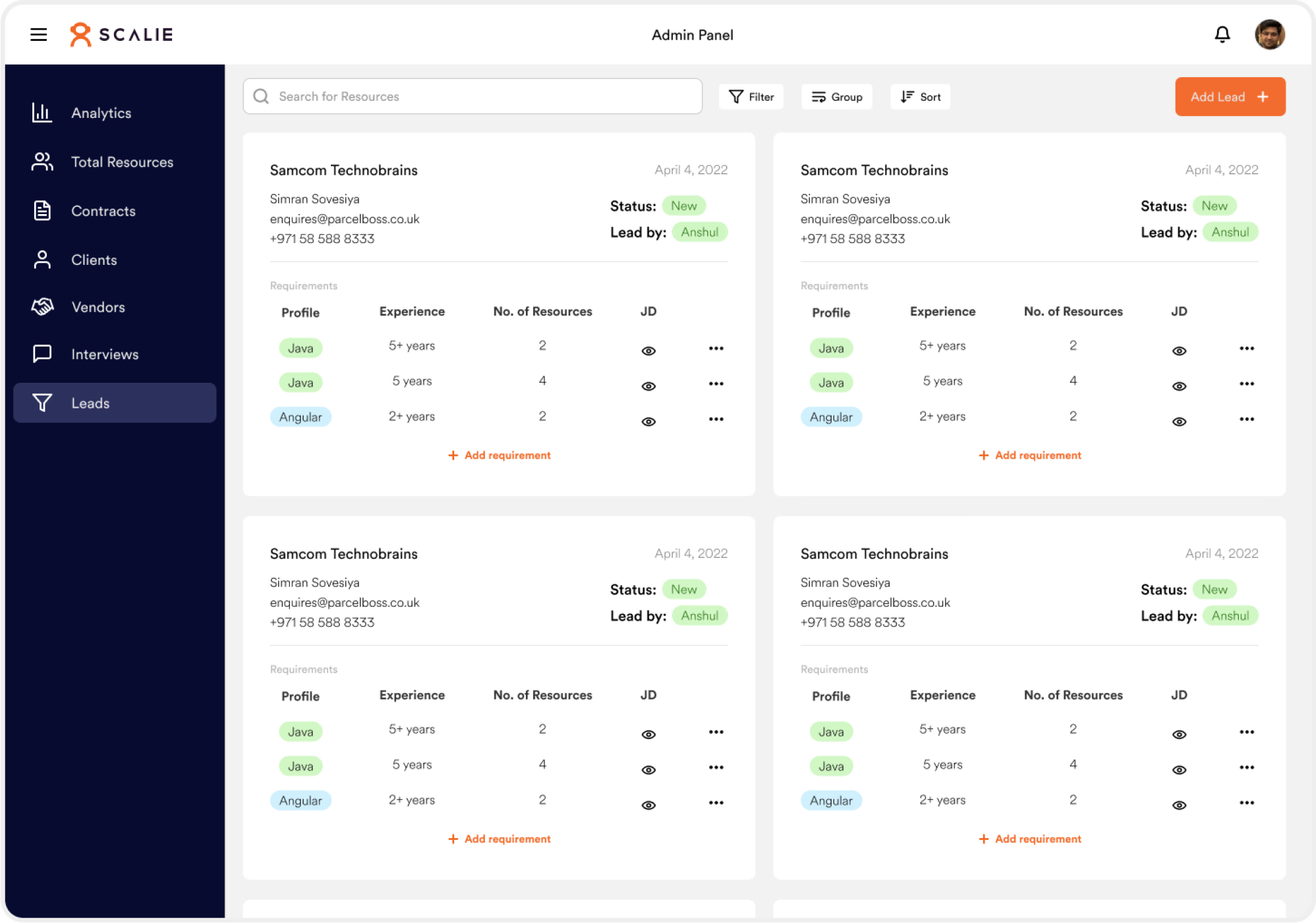
The Lead Management module enables administrators to review incoming client requirements while maintaining visibility into each opportunity.
This improves accountability and ensures no requirement is overlooked.
User Testing
After completing the initial MVP, prototypes were tested with vendors, clients, and internal administrators as they performed their daily tasks.
The objective wasn't simply to identify usability issues.
It was to understand how the platform integrated into existing operational workflows.
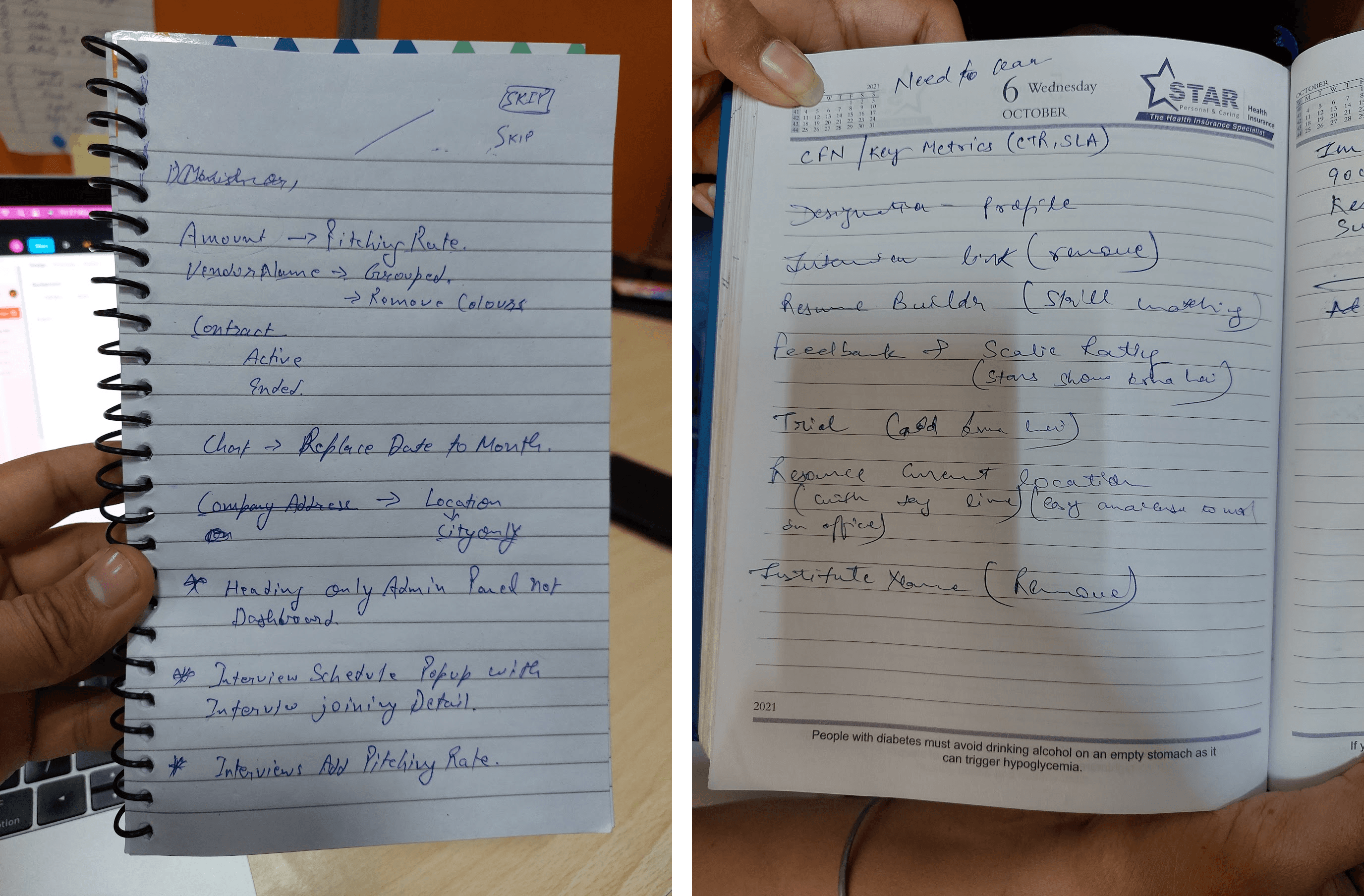
Over a 30-day period, continuous discussions and usability sessions helped identify opportunities for refinement.
Key Improvements After Testing
Several improvements emerged from usability testing. These included:
Rather than treating testing as validation, it became an opportunity to strengthen the product before implementation.
Results
Although Scalie was launched as an MVP, the platform significantly improved operational efficiency by replacing fragmented manual workflows with a centralized management system.
Outcomes
Resource allocation time decreased by streamlining candidate discovery and operational workflows.
Administrative workload was reduced through centralized information management and workflow automation.
Data accuracy increased by maintaining a single source of truth for resource information.
Communication delays decreased by replacing fragmented conversations with shared visibility across teams.
Bench resource idle time decreased through improved allocation and tracking.
Looking Back
Designing Scalie reinforced an important lesson about enterprise software.
Enterprise products are rarely difficult because of interface complexity.
They become difficult because every workflow depends on another team.
A small change to one process can influence vendors, administrators, recruiters, clients, and resource managers simultaneously.
This project strengthened my ability to think beyond individual screens and design systems that support real operational workflows.
Mindset Shift
Rather than asking, “How should this page look?”
I found myself asking, “How should information move across the organization?”
That shift fundamentally changed the way I approach enterprise product design.
Future Opportunities
Although the MVP successfully addressed the organization's immediate operational challenges, several opportunities remain for future iterations.
Providing clients with a richer self-service experience would reduce dependency on manual communication while improving transparency.
Introducing AI-assisted recommendations could help administrators identify the most suitable candidates based on skills, availability, experience, and historical deployment success.
Automating repetitive operational tasks would further reduce manual effort and improve organizational efficiency.
Supporting mobile workflows would enable administrators and vendors to manage critical activities while away from their desks.
Reflection
Scalie wasn't just about designing dashboards.
It was about designing the operational backbone of a staffing organization.
Every decision—from the information architecture to the smallest interaction—was influenced by how people collaborated, shared information, and moved work forward.
The most valuable lesson from this project wasn't learning how to design enterprise interfaces.
It was learning how to simplify complexity without hiding it.
Design isn't simply about making software easier to use.
It's about helping organizations work better together.